Adding Similar or Like Posts to my WordPress Website
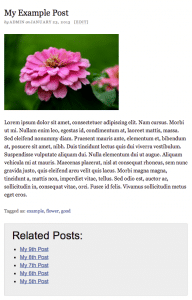
 Often times as you blog, you would like to be able to link to other posts that are similar to the current post. “Similar” posts can be defined by posts with the same categories or tags. Pulling similar posts based on categories and tags is a very simple PHP script that can be added to any hook in any popular theme like Thesis or Genesis. The example that I’m going to show is defined in the wp-content/themes/thesis_18x/custom/custom_functions.php file in the thesis 1.8.x theme.
Step 1. Open up the custom_functions.php file in your thesis themes custom folder and paste in the following action hook (This code will tell WP to execute the “show_similar_posts” function after a post):
<?php add_action('thesis_hook_after_post','show_similar_posts'); ?>
Step 2. Paste the following code into the same code block (<?php ?>)
[rendercode:similarposts]
Step 3. Modify the parameters in the section called “set parameters”. There are five different parameters available.
- $num_posts = 5; //Any number of posts within reason
- $order_by = “post_date”; //Any value defined here.
- $order_dir = “ASC”; //ASC – Ascending or DESC – Descending order
- $query_by = “tags”; //I created the function to find similar posts by ‘tags’ or by ‘categories’
- $post_type = “post”; //This can be ‘post’, ‘page’ OR ‘any’
IT’S TIME TO
GET READY FOR 2026!
Get organized for 2026 with the easy to use monthly calendar! Simply opt in below to have the FREE calendar sent straight to your inbox.